Installation
Installing a web app basically means adding it to the Home Screen or desktop of your device. There is no executable code installed on your device like with native apps. Web apps always run inside a browser environment and all code is executed and all data is saved inside that environment. This makes web apps secure by default.
Chromium-based browsers (all platforms)
Progressive Web Apps can be installed to the home screen on mobile devices and desktop on laptops and desktop
computers. On Chromium based browsers, the beforeinstallprompt event is fired when the web app is
eligible to be installed. This event will display a native install dialog that includes a button to install the
web app.
Safari (and all browsers on iOS)
In Safari, the beforeinstallprompt event is not fired. Instead, the user can install the web app through
the "Share" menu. On macOS, the user can choose "Add to Dock" to install the web app. On iOS, the user can choose
"Add to Home Screen".
Firefox (Android)
In Firefox, the beforeinstallprompt event is not fired. On iOS, installation is the same as in Safari.
On Android, the user can tap menu in the top-right corner or bottom-right corner, depending on the position of the
address bar, then swipe up and tap "Install", or tap "More" and then choose "Add app to Home Screen" depending on
the version of Firefox. On desktop, PWAs cannot be installed through Firefox.
Samsung Internet Browser (Android)
On Android, Samsung Internet Browser supports the beforeinstallprompt event, but installation may fail
silently if the manifest.json file contains the share_target member with method
set to POST.
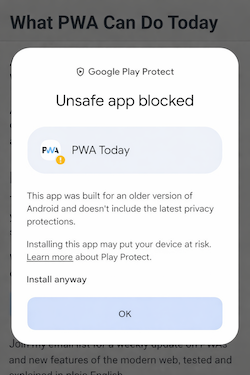
The PWA may also be flagged as "unsafe" by Google Play Protect, presumably because the WebAPK generated by Samsung Internet Browser is not trusted by Google Play Protect. The criteria and reasons for this are unclear, and usually the app can still be installed through the "Install anyway" link in the warning dialog.
Demo
Click the "Add to home screen" button below to install this web app. In supporting browsers, the native install dialog will appear and in non-supporting browsers, a bottom sheet with instructions how to install this web app will be displayed.
Experimental: Web Install API
The Web Install API allows web apps to be installed to the home screen of a device. It can be used to install the current web app or web apps from other domains. This enables installing web apps from app stores for example.
To install the current web app, use navigator.install();
To install a web app from another domain, use
navigator.install({manifest: 'https://otherdomain.com/manifest.json', manifestId: 'https://otherdomain.com/app-id'});
where the second argument is the Computed app ID of the web app.
To find the Computed app ID, open the Application tab in the Chrome DevTools, click "Manifest" on the left, and look for the "Computed app ID" field in the right pane.
The Web Install API is supported in Chrome and Edge 143+ through an origin trial.
Demo
Click the button below to install the store.app and pwastore.io web apps from this PWA.
Experimental: HTMLInstallElement
The declarative <install> renders a button that allows web apps to be installed to the home screen of a device.
Just like the Web Install API, it can be used to install the current web app or web apps from other domains.
The content and presentation of the button are controlled by the user agent.
When used without attributes, it will install the current web app:
<install></install>
With the attributes installurl and manifestid, it can be used to install web apps from other domains:
manifest specifies the manifest of the web app to install. If unspecified, the current web app will be installed,
manifestId specifies the computed id of the web app to install. If unspecified, the
manifest.json file of the web app at installurl must have a custom id defined. If
specified, it must match the computed id of the web app to be installed.
Demo
Click the <install> element below to install the current web app or store.app.
 Install What PWA Can Do Today
 Install store.app
Handling the install prompt
A best-practice is to defer the display of the install dialog using event.preventDefault() and
displaying it when it makes more sense, for example, when the user explicitly clicks a button to install the web
app.
For a web app to be eligible to be installed, it must meet some technical requirements:
- The web app must have a manifest.json file
- The web app must be served over https
The manifest.json file tells the browser how the PWA should appear and behave on the device and for a web app to be installable it must have the following required members:
nameorshort_nameiconsmust contain at least one icon with arbitrary dimensionsstart_urldisplayand/ordisplay_override, value must be "standalone", "fullscreen", or "minimal-ui",display_overridemay also be "tabbed" or "window-controls-overlay"
For a description of these members, see the Web app manifest reference
Screenshots
In addition to these required members, a description of the web app and an optional array of screenshots can be included that will be shown in the native install dialog, bringing the install process closer to that of native apps.
Screenshots must follow these criteria:
- Width and height must be at least 320px and at most 3,840px.
- The maximum dimension can't be more than 2.3 times as long as the minimum dimension.
- All screenshots with the same form factor value must have identical aspect ratios.
- Only JPEG and PNG image formats are supported.
- Only eight screenshots will be shown. If more are added, the user agent simply ignores them.
In addition, all screenshots must have a form_factor property that indicates whether the screenshot is
displayed on mobile devices (value is "narrow") or desktop devices (value is "wide").
Documentation
Making Progressive Web Apps Installable on MDNBrowser support
The beforeinstallprompt event and the screenshots member of the manifest.json file are
supported in Chromium based browsers, including Chrome, Edge, and Opera. For other browsers, you need to display
a dialog with instructions on how to install the web app.